Sync Targets per Service
When a project runs as several services — an API, a scheduler, a frontend, an auth service — each one usually needs a different set of variables. PORT, DATABASE_URL or a process name differ per service, while a handful of settings are the same everywhere.
EnvManager lets you describe exactly that: every integration can have several sync targets per environment, each one sending a different slice of your variables to a different resource on the platform.
What You Can Do
- Shared variables → one shared resource (for example a Render environment group)
- Each service's variables → its own resource (a Render service, a Dokploy application, a Vercel project, …)
- Mix platforms — the frontend on Vercel and the backend on Render, from one environment
- See what's uncovered — EnvManager warns when a service has no target
- Preview removals before narrowing a target's scope
Before You Begin
You'll need:
- A project with Services defined (for example
api,auth,scheduler) - Variables assigned to those services — variables with no service are shared
- A connected platform integration (see the platform pages in this section)
No services in your project? Then nothing changes for you: every target sends the whole environment and you will not see the scope selector.
The Three Scopes
Every sync target has a scope that decides which variables it sends:
| Scope | Sends | Typical use |
|---|---|---|
| Whole environment | Every variable, shared or service-specific | Projects without services, or a single monolith |
| Shared variables only | Variables that belong to no service | A Render environment group linked to all services |
| One service | That service's variables plus the shared ones | The Render service / Dokploy app running that service |
A service target always includes the shared variables, so you never have to duplicate SUPABASE_URL into every service.
Setting Up Per-Service Targets
Open the integration configuration
Go to your project → Integrations and click Configure on the platform you connected.
Pick the scope for the first target
At the top of each environment tab you'll find Variables to sync. For a project with services it defaults to Shared variables only. Choose the platform resource that should receive the shared variables (for Render, this is usually an environment group).
Add a target per service
Click Add target. The new row is pre-selected for the first service that has no target yet. Pick the platform resource for that service and repeat until every service is covered.
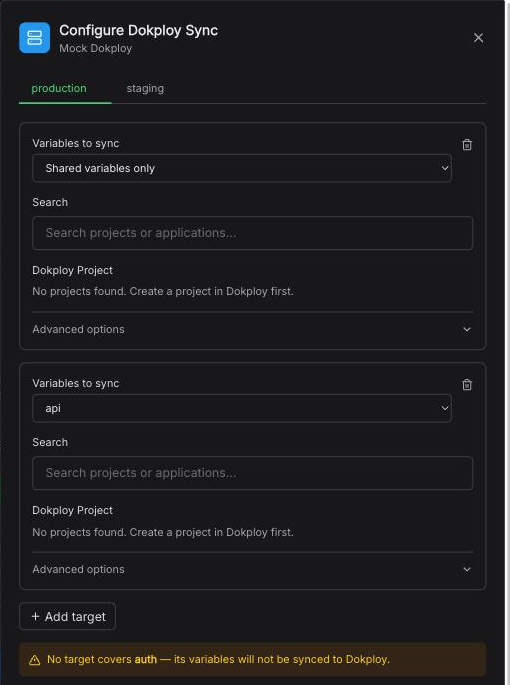
One environment, several targets: shared variables go to one resource, the api service to another, and auth is still uncovered.
Check the coverage warning
If a service is left without a target, the tab shows "No target covers worker — its variables will not be synced". Add a target for it, or use a Whole environment target if that's what you want.
Save
Click Save Configuration. Targets you removed in the editor are deleted; the others are updated in place.
Removing a Target
Every target row has a trash icon in its top-right corner, including the last one left in an environment. Removing all of an environment's targets is how you undo a configuration you made on the wrong environment — the tab then warns that the environment has no sync targets, and the removal takes effect when you click Save Configuration.
After that, the environment's variables stay in EnvManager and nothing is pushed to the platform for it. The other environments keep their own targets untouched.
At least one environment must keep a target. To switch the integration off entirely, use Disconnect on the integration card instead.
Which Environment Am I Configuring?
Each environment has its own targets, and the configure modal edits one environment at a time. Two things tell you where you are:
- The environment tabs at the top of the modal — the active one is highlighted, and the dot next to each name is green when that environment already has a target.
- The "Configuring <environment>" banner directly above the targets, which repeats the environment name so a target picked from a long resource list ends up where you meant it to.
Platform resources are often named after an environment too (for example a Dokploy application
called MyApp (production)). The banner refers to your EnvManager environment — the two do not
have to match, but check the banner before you save.
Changing a Target's Scope
If you narrow an existing target — for example switching an environment group from Whole environment to Shared variables only — the platform still holds the keys the old scope sent. EnvManager shows you exactly which keys will be removed on the next sync, before you save:
On the next sync, 2 keys will be removed from the resource because the new scope no longer sends them:
APP_PORT,APP_AKB_PROCESS
Nothing is removed until you save and the next sync runs.
Auto-sync and Services
With auto-sync enabled, a change only triggers the targets it affects:
- Editing a shared variable re-syncs every target of that environment.
- Editing a variable that belongs to
authre-syncsauth's target and any Whole environment target — not theapiorfrontendtargets.
This keeps platforms that redeploy on every variable change (like Render) from redeploying services that didn't change.
Deleting a Service
A service cannot be deleted while it still has variables or sync targets. Move its variables to another service (or make them shared) and remove its targets in the integration settings first. This protects you from a service's secrets silently becoming shared and being pushed to every resource.
Frequently Asked Questions
Can one service sync to two platforms? Yes. Add a target for the service in each platform's configuration — for example Render for runtime and a second platform for CI.
Can I have both a Whole environment target and per-service targets? Yes, but be aware the Whole environment target will receive the service-specific variables too, which is usually the collision you are trying to avoid. Use Shared variables only for the common resource instead.
Does this work for GitHub? Not yet. GitHub environments always receive the whole environment.