Variable References
As your project grows, you'll often find that multiple variables share a common value — like a base URL or a service hostname. Instead of duplicating that value across several variables, you can use variable references to point one variable's value at another.
A reference uses the ${VARIABLE_NAME} syntax. When your application pulls its configuration, EnvManager resolves these references and returns the final computed values.
Why Use References?
References help you avoid duplication and reduce the risk of inconsistencies. Consider this example:
| Key | Without References | With References |
|---|---|---|
API_HOST | https://api.example.com | https://api.example.com |
USERS_URL | https://api.example.com/users | ${API_HOST}/users |
ORDERS_URL | https://api.example.com/orders | ${API_HOST}/orders |
If API_HOST changes, the referenced variables automatically resolve to the new value — no need to update each one individually.
Before You Begin
Variable references resolve within the same environment only. A reference in Development will look up other Development variables, not Staging or Production.
To use references, you need:
- An EnvManager account with access to a project
- At least one existing variable to reference
See Variables Overview if you haven't created any variables yet.
Creating a Variable with References
Open the Add Variable Form
Navigate to your project and select the environment. Click Add Variable to open the form.
Enter the Reference Syntax
In the Value field, type ${ followed by the name of the variable you want to reference. For example, to build a URL from an existing API_HOST variable:
${API_HOST}/users
You can combine references with regular text, or use multiple references in a single value:
${PROTOCOL}://${HOST}:${PORT}/api
Check the Resolved Preview
As you type, a Resolves to preview appears below the value field. This shows you the final computed value after all references are resolved.
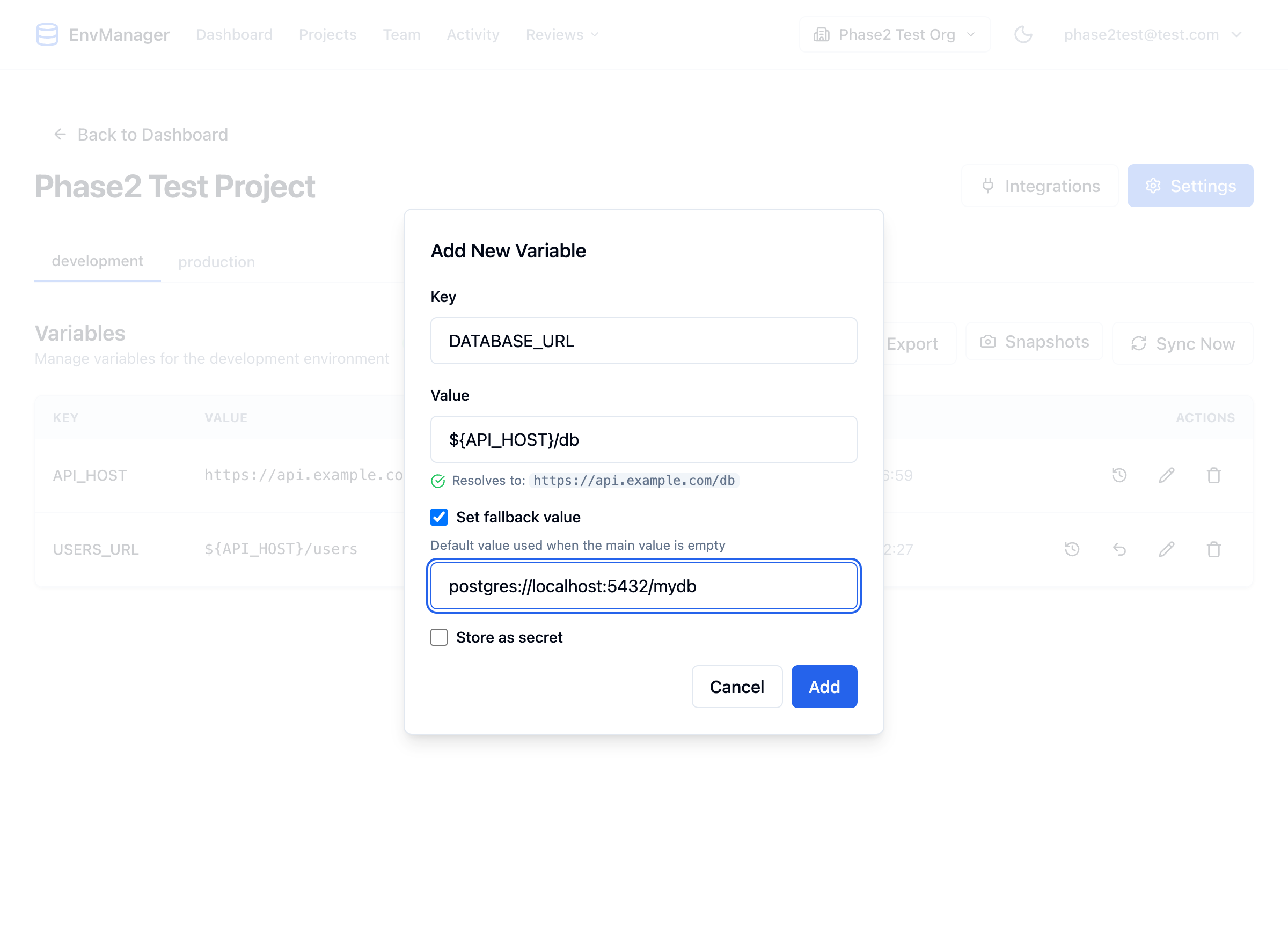
The resolved preview confirms that the reference will produce the expected value.
Save the Variable
Click Add to create the variable. It will appear in the variables list with its reference syntax visible.
Understanding Reference Badges
After saving, the variables list shows relationship badges that help you understand how your variables are connected.
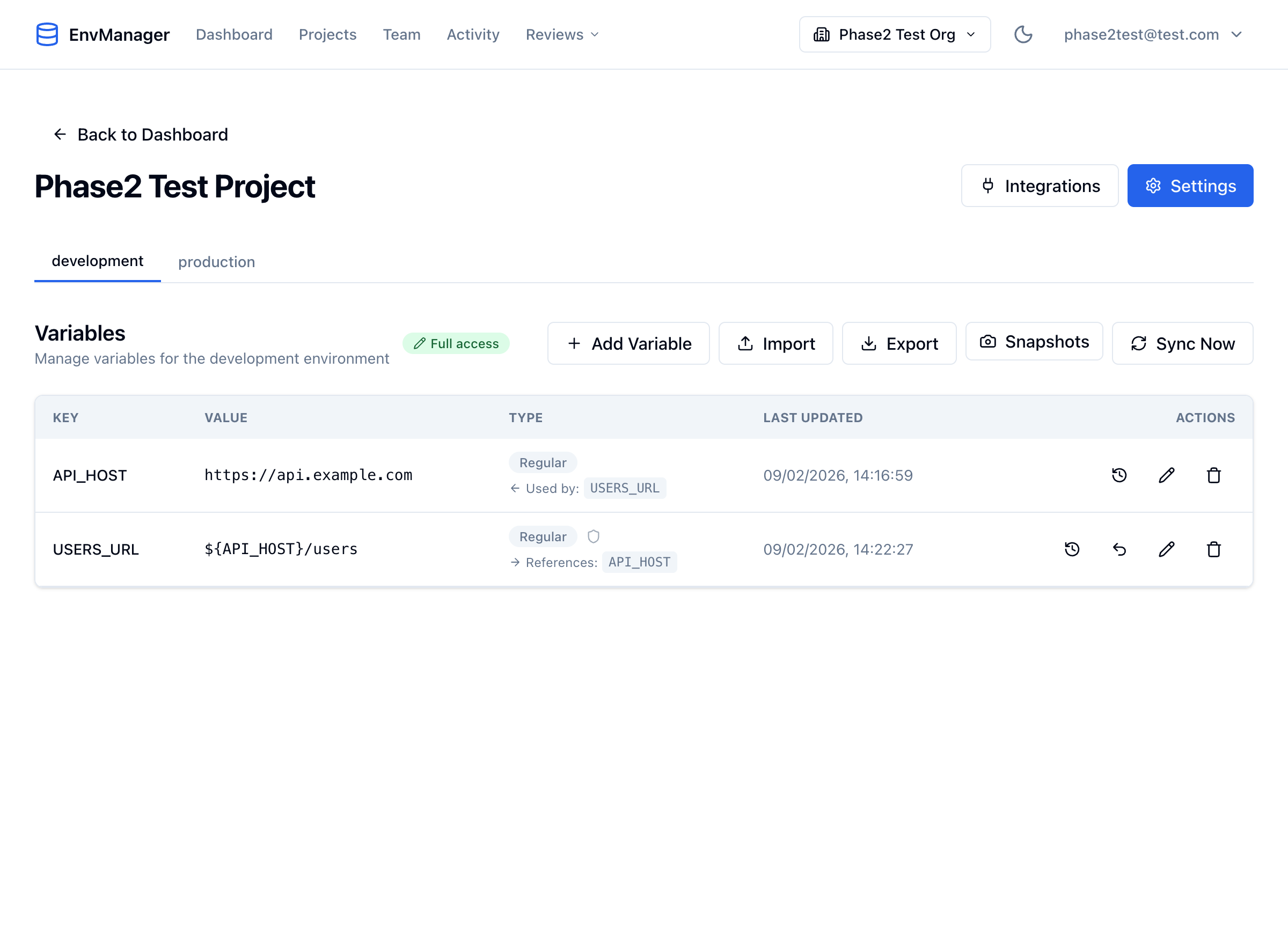
Reference badges show the relationships between variables at a glance.
| Badge | Meaning |
|---|---|
| References: X | This variable uses the value of variable X in its own value |
| Used by: X | Variable X includes a reference to this variable |
These badges make it easy to see which variables depend on each other without inspecting each value individually.
Editing and Deleting Referenced Variables
When you edit or delete a variable that other variables depend on, EnvManager warns you about the impact.
Editing a Referenced Variable
If you edit a variable that is used by other variables, a confirmation dialog tells you which variables will be affected. Their resolved values will change automatically once you save.
Deleting a Referenced Variable
If you try to delete a variable that is used by other variables, a warning dialog lists the dependent variables. Deleting it will leave those references unresolved — the ${VAR} syntax will appear as literal text in the resolved output.
Always check the reference badges before deleting a variable. If it shows Used by other variables, update or remove those references first.
Resolution Rules
Understanding how references resolve helps you avoid surprises:
- Same environment only — References look up variables within the current environment
- Maximum depth of 10 — References can chain (A → B → C) up to 10 levels deep
- Circular references are blocked — If A references B and B references A, EnvManager detects the loop and shows an error
- Unresolved references stay as-is — If a referenced variable doesn't exist, the
${VAR}text remains in the output - Self-references are not allowed — A variable cannot reference itself
Using References with the CLI
The EnvManager CLI supports reference resolution when pulling variables:
# Pull variables with references resolved to their final values
envmanager pull --resolve-references

# Short form
envmanager pull -r

# Show which variables contributed to each resolved value
envmanager pull --resolve-references --show-sources
Without --resolve-references, the CLI returns the raw ${VAR} syntax — useful if your application handles resolution itself.
Tips
Keep reference chains short. While EnvManager supports up to 10 levels of chained references, shorter chains are easier to understand and debug. One or two levels of indirection is usually enough.
- Use references for shared base values — Base URLs, hostnames, and port numbers are ideal candidates
- Don't reference secrets from regular variables — If
API_KEYis a secret, referencing it from a regular variable would expose the value - Check the resolved preview before saving — The preview catches typos and missing variables before they become a problem
Next Steps
Fallback Values
Set default values that activate when the main value is empty.
Variables Overview
Learn the basics of creating and managing variables.
Import Variables
Bulk import from .env files with automatic secret detection.