Proxy Templates
Templates are pre-configured starting points for common APIs. When you select a template, it fills in the target URL, HTTP method, headers, and secret mapping hints automatically — you only need to select which secret variable to use.
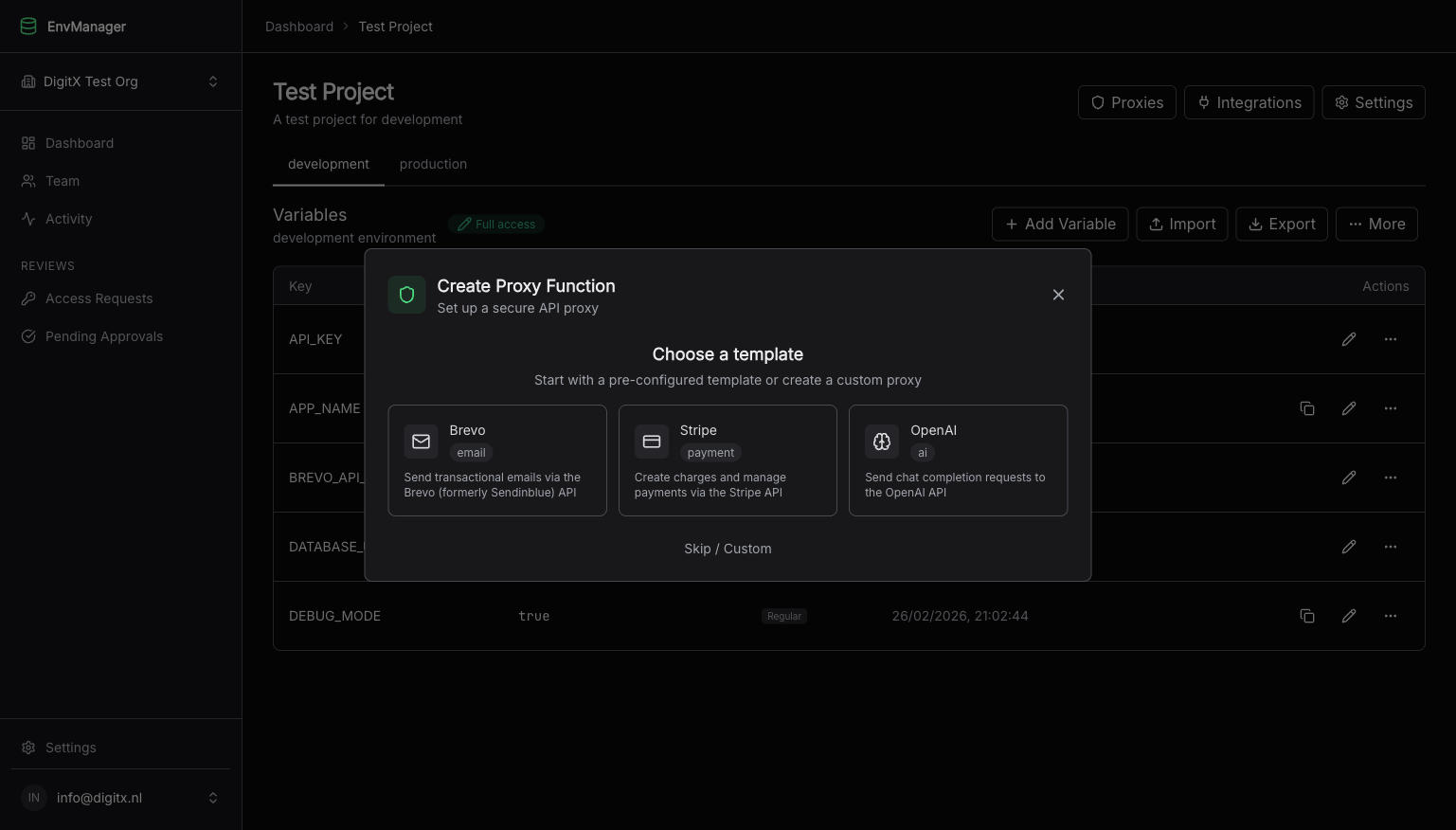
The template selector appears when creating a new proxy function.
How Templates Work
When you select a template:
- The name, target URL, HTTP method, and static headers are pre-filled
- Secret mapping hints are added with the correct injection method and key name — you just pick the variable
- You can still modify any field before saving
Templates are a starting point, not a constraint. After selecting one, you have full control to change anything.
If you start creating a proxy from a secret variable's action menu, the template selector also appears. When you pick a template, the variable you started from is automatically assigned to the first secret mapping.
Available Templates
Brevo (Email)
Send transactional emails via the Brevo API (formerly Sendinblue).
| Setting | Pre-filled Value |
|---|---|
| Target URL | https://api.brevo.com/v3/smtp/email |
| HTTP Method | POST |
| Static Headers | Content-Type: application/json, Accept: application/json |
| Secret Mapping | Header api-key — select your BREVO_API_KEY variable |
| Request Body | Pass through (your frontend sends the email payload) |
What You Need
- A Brevo account with an API key (generate one here)
- The API key stored as a secret variable in EnvManager (e.g.,
BREVO_API_KEY)
Example: Send a Transactional Email
After creating the proxy, call it from your frontend:
const response = await fetch(PROXY_URL, {
  method: 'POST',
  headers: {
    'x-proxy-token': PROXY_TOKEN,
    'Content-Type': 'application/json'
  },
  body: JSON.stringify({
    sender: { name: 'My App', email: 'noreply@myapp.com' },
    to: [{ email: 'user@example.com', name: 'User' }],
    subject: 'Welcome to My App',
    htmlContent: '<h1>Welcome!</h1><p>Thanks for signing up.</p>'
  })
})
The proxy adds the api-key header with your Brevo API key automatically. The request body is forwarded as-is to the Brevo API.
Common Use Cases
- Contact form submissions
- Order confirmation emails
- Password reset emails
- Newsletter signup confirmations
Stripe (Payments)
Create charges and manage payments via the Stripe API.
| Setting | Pre-filled Value |
|---|---|
| Target URL | https://api.stripe.com/v1/charges |
| HTTP Method | POST |
| Static Headers | Content-Type: application/x-www-form-urlencoded |
| Secret Mapping | Header Authorization with template Bearer ${value} — select your STRIPE_SECRET_KEY variable |
| Request Body | Pass through |
What You Need
- A Stripe account with a secret key (find it in your dashboard)
- The secret key stored as a secret variable in EnvManager (e.g.,
STRIPE_SECRET_KEY)
The Stripe template points to /v1/charges by default. Change the target URL if you need a different endpoint (e.g., /v1/payment_intents, /v1/customers).
Example: Create a Payment Intent
Change the target URL to https://api.stripe.com/v1/payment_intents, then call:
const response = await fetch(PROXY_URL, {
  method: 'POST',
  headers: {
    'x-proxy-token': PROXY_TOKEN,
    'Content-Type': 'application/x-www-form-urlencoded'
  },
  body: new URLSearchParams({
    amount: '2000',        // Amount in cents ($20.00)
    currency: 'usd',
    'payment_method': 'pm_card_visa',
    confirm: 'true'
  }).toString()
})
The proxy adds the Authorization: Bearer sk_live_... header using your stored Stripe secret key.
Common Use Cases
- One-time payments from static checkout pages
- Donation forms
- Simple product purchases
- Subscription creation
For more complex Stripe integrations (webhooks, subscription management), consider using a server-side framework or downloading the proxy code for self-hosting.
OpenAI (AI/LLM)
Send chat completion requests to the OpenAI API.
| Setting | Pre-filled Value |
|---|---|
| Target URL | https://api.openai.com/v1/chat/completions |
| HTTP Method | POST |
| Static Headers | Content-Type: application/json |
| Secret Mapping | Header Authorization with template Bearer ${value} — select your OPENAI_API_KEY variable |
| Request Body | Pass through |
What You Need
- An OpenAI account with an API key (generate one here)
- The API key stored as a secret variable in EnvManager (e.g.,
OPENAI_API_KEY)
Example: Chat Completion
const response = await fetch(PROXY_URL, {
  method: 'POST',
  headers: {
    'x-proxy-token': PROXY_TOKEN,
    'Content-Type': 'application/json'
  },
  body: JSON.stringify({
    model: 'gpt-4o-mini',
    messages: [
      { role: 'system', content: 'You are a helpful assistant.' },
      { role: 'user', content: 'What is EnvManager?' }
    ],
    max_tokens: 200
  })
})

const data = await response.json()
console.log(data.choices[0].message.content)
The proxy adds Authorization: Bearer sk-... using your stored OpenAI API key.
Common Use Cases
- AI-powered chatbots on static sites
- Content generation tools
- Text summarization
- Code assistants
OpenAI API calls can be expensive. Always enable rate limiting on your OpenAI proxy to prevent abuse. A limit of 10–30 requests per minute is a good starting point.
Customizing Templates After Selection
Templates are starting points. After selecting one, you can modify anything:
- Change the target URL — for example, switch the Stripe template from
/v1/chargesto/v1/customers - Add more secret mappings — some APIs require multiple credentials
- Add static headers — for example, a custom
User-Agentheader - Enable rate limiting — strongly recommended for all proxies, especially AI endpoints
- Restrict CORS origins — replace
*with your actual domain for production
Creating Without a Template
If your API is not covered by a template, click Skip / Custom on the template selector to start with a blank form. See Creating a Custom Proxy Function for details.
Related Topics
Creating Proxy Functions
All three ways to create a proxy function.
Integrating in Your Code
Replace direct API calls with your proxy URL.
Configuration
Customize secret mappings, CORS, and request bodies.
Rate Limiting
Protect proxies from abuse and runaway costs.